Hevy vs Pawer: which workout tracker should you use?
 Anton YefanovUpdated
Two gym logs that look alike at first glance and are built on opposite ideas. Hevy is a social, cross-platform tracker with an account in the cloud. Pawer is a private, offline iPhone log with no account at all.
We make Pawer, so read this with that in mind. Where Hevy is the better app for you, this page says so, and every number about Hevy links to where we found it.
The short answer
Pick Hevy if you train with friends, use Android or an Apple Watch, or want your log synced across devices. Pick Pawer if you want a fast, private log on your iPhone that works with no signal and never asks you to sign up.
Pick Hevy if
- You use Android, a smartwatch or the web
- A feed of friends' workouts keeps you going
- You want your history backed up to the cloud
- You work with a coach who uses Hevy Coach
Pick Pawer if
- You train on an iPhone and want no account
- Your gym has bad signal, or none
- You want a video for every exercise, offline
- You would rather keep your training data private
At a glance
| Feature | Pawer | Hevy |
|---|---|---|
| Best for | Private, offline logging on iPhone | Social training across every device |
| Platforms | iPhone | iPhone, iPad, Android, Apple Watch, Wear OS, web |
| Account | None. Open the app and log | Required |
| Where data lives | On your phone only | Hevy's cloud, synced to your devices |
| Exercise demos | 412 exercises, each with a video that plays offline | About 450 exercises with animations |
| Social feed | No, by design | Yes: follow, like, comment, leaderboards |
| Pro price | $2.99 a month, $29.99 a year, $69.99 once | $2.99 a month, $23.99 a year, $74.99 once |
| Import history | Imports Strong and Hevy CSV | Imports Strong CSV |
Pricing and free tier
Both apps are free to start and both sell the same three ways to upgrade. The monthly price is identical. Hevy's yearly plan is $6 cheaper; Pawer's lifetime unlock is $5 cheaper and comes with a 7-day trial on the yearly plan.
The bigger difference is what stays free. Hevy's free tier allows more saved routines and custom exercises. Pawer's free tier keeps your full history and every exercise video, with no account to create.
| Feature | Pawer | Hevy |
|---|---|---|
| MonthlyTie | $2.99 | $2.99 |
| Yearly | $29.99, with a 7-day free trial | Better$23.99 |
| Lifetime | Better$69.99 once | $74.99 once |
| Free workout loggingTie | Unlimited | Unlimited |
| Free saved routines | 3 templates | Better4 routines |
| Free custom exercises | 3 | Better7 |
| Free chartsTie | Shorter ranges; Pro unlocks longer ones | Last 3 months; Pro unlocks all time |
| Account needed to use it | BetterNo | Yes |
US App Store prices, checked October 14, 2026. Prices differ by country and both apps change them from time to time.
What each plan costs over time
If you lift for years, the lifetime unlock is the cheapest way to use either app. It pays for itself in under three years against Hevy's yearly plan and in a little over two against Pawer's.
| Feature | Pawer | Hevy |
|---|---|---|
| 1 year, monthly | $35.88 | $35.88 |
| 1 year, yearly | $29.99 | $23.99 |
| 3 years, yearly | $89.97 | $71.97 |
| 5 years, yearly | $149.95 | $119.95 |
| Lifetime, any length | $69.99 | $74.99 |
Logging a workout
2 to Pawer, 2 to Hevy, 3 tied
This is where you spend most of your time in either app, and both get the basics right. Your previous weights and reps show up next to each set, and set types cover warm ups, drop sets and supersets.
| Feature | Pawer | Hevy |
|---|---|---|
| Previous values on each setTie | Yes, filled in | Yes |
| Warm up, drop sets, supersetsTie | Yes | Yes, plus failure sets |
| Rest timerTie | Live Activity on the Lock Screen and Dynamic Island | Set per exercise, so each lift gets its own rest |
| Guided circuits | BetterRounds, next exercise and a rest countdown | Supersets, no round view |
| RPE per set | No | BetterYes |
| Plate calculator | Free web plate calculator | BetterBuilt into the app |
| Works with no signal | BetterEverything, including videos | Logs offline, syncs later |
Exercise library
2 to Pawer, 1 to Hevy, 1 tied
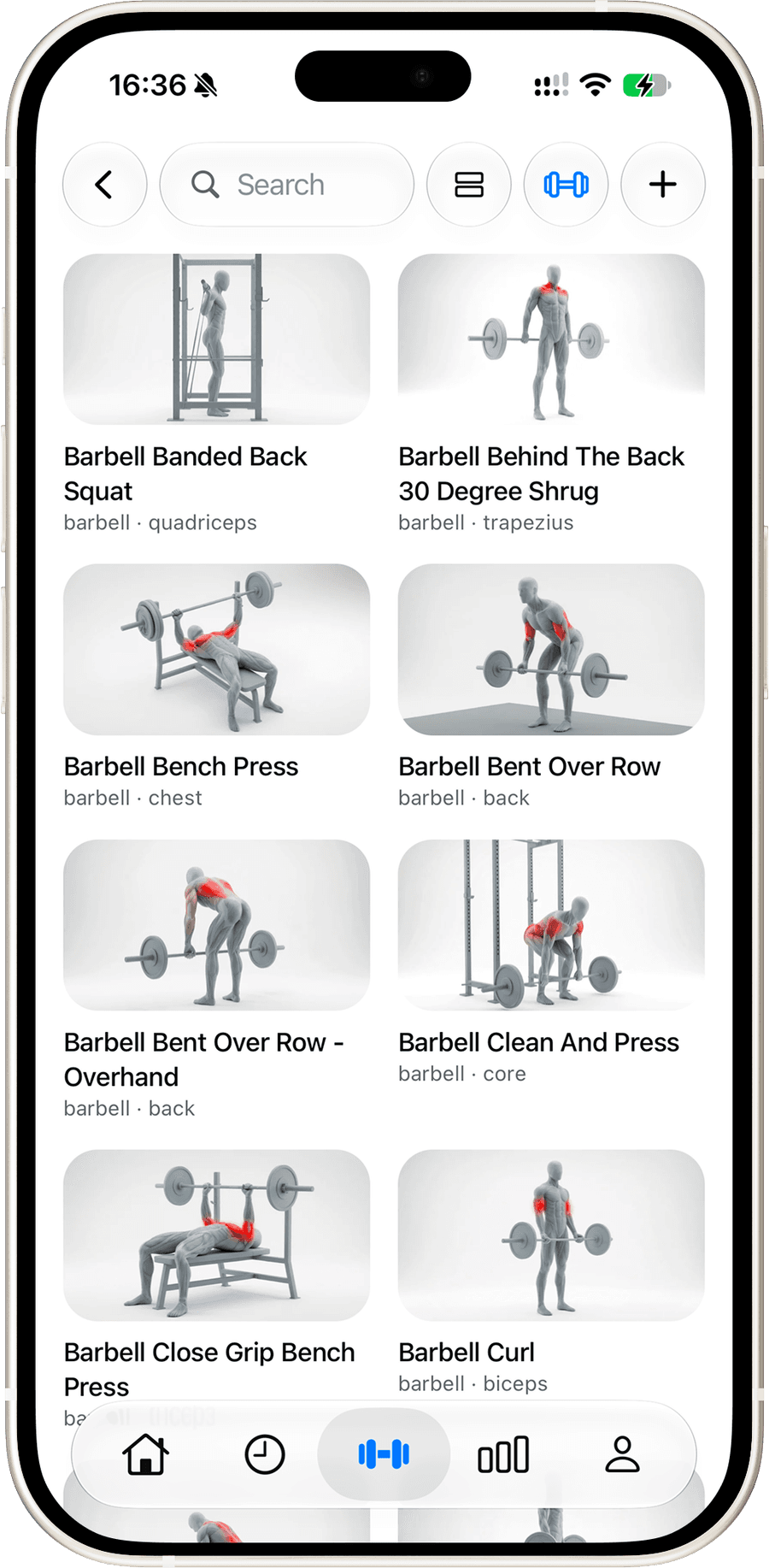
Hevy's library is a little larger. Pawer's demos are full video clips with the working muscles highlighted, and they ship inside the app, so they play in a basement gym with no signal.
| Feature | Pawer | Hevy |
|---|---|---|
| Size | 412 exercises | BetterAbout 450 exercises |
| Demos | BetterVideo for every exercise | Animation for every exercise |
| Plays offline | BetterYes, every clip is on your phone | Partly |
| Custom exercisesTie | Yes, with your own photo | Yes |
Progress and stats
0 to Pawer, 1 to Hevy, 4 tied
| Feature | Pawer | Hevy |
|---|---|---|
| Personal recordsTie | Detected automatically, pinned to the workout | Detected automatically |
| Estimated 1RM per liftTie | Yes | Yes |
| Training calendar and volumeTie | Yes, with progressive overload marks | Yes, with muscle group charts |
| AchievementsTie | Tiers per lift, with share cards | Streaks and leaderboards |
| Body measurements | No | BetterBody weight free, more with Pro |
Platforms and integrations
0 to Pawer, 4 to Hevy, 1 tied
This is Hevy's clearest win. If you use Android, wear a watch while you lift, or want the same log on a laptop, Hevy covers it and Pawer does not.
| Feature | Pawer | Hevy |
|---|---|---|
| iPhoneTie | Yes | Yes |
| Android | No | BetterYes |
| Apple Watch and Wear OS | No | BetterYes |
| Web app | No | BetterYes |
| Apple Health, Health Connect, Strava | No | BetterYes |
Privacy and your data
2 to Pawer, 1 to Hevy, 1 tied
Pawer has no accounts and no sync server: your log is a database on your phone. That is the point of the app, and it comes with a trade. If you lose your phone without a device backup, your history goes with it. Hevy keeps your data in its cloud, which means a sign up, and also means your log follows you to a new phone.
| Feature | Pawer | Hevy |
|---|---|---|
| Account | BetterNone | Required |
| Where workouts are stored | BetterOn your phone | Hevy's servers |
| Cloud backup and sync | No, use your phone's backup | BetterYes |
| Health app dataTie | Never read | Optional sync |
Side by side
The same jobs in each app, on iPhone. Hevy screenshots are from the free tier.
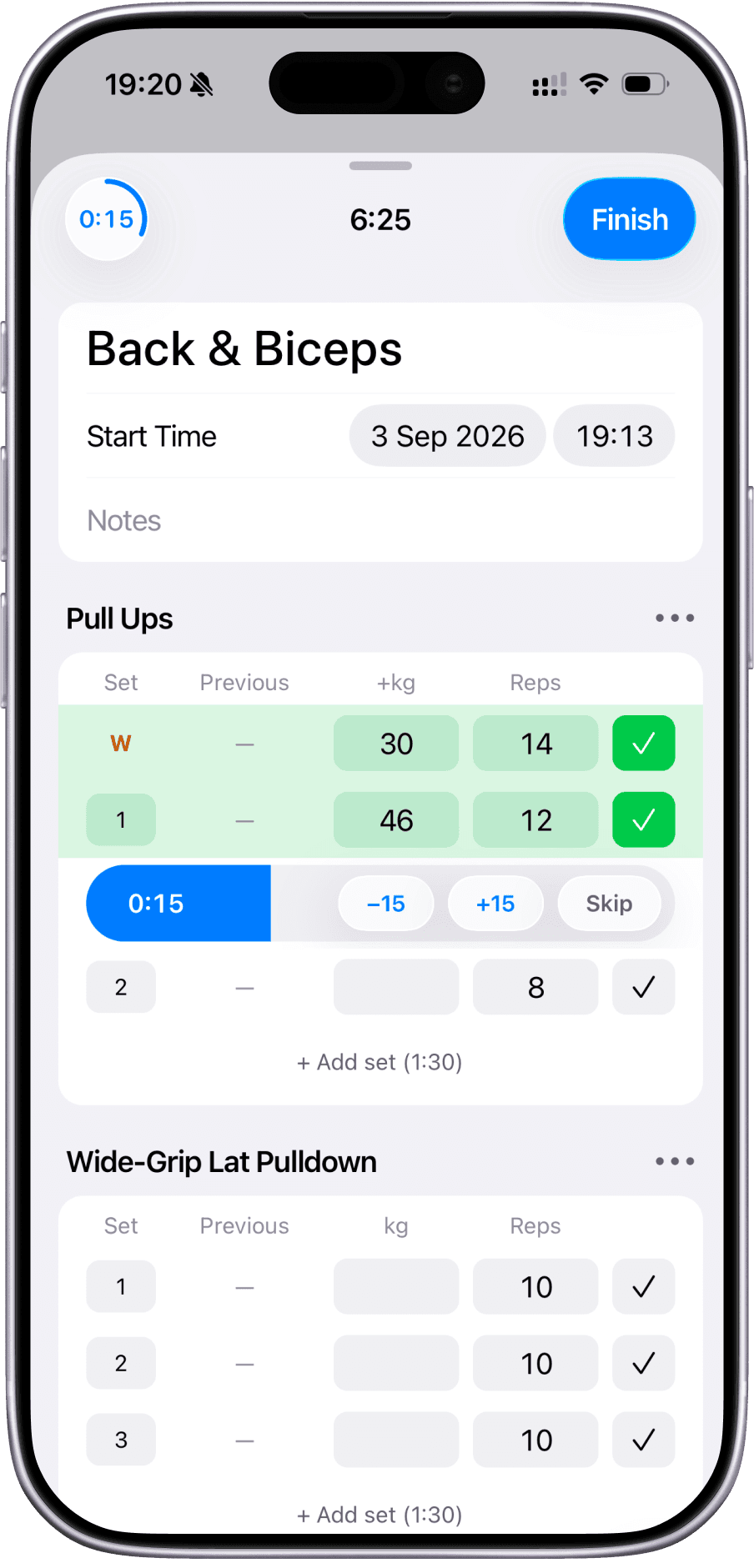
Logging a workout
Both show your last set next to the one you are logging. Hevy sets a rest timer per exercise; Pawer runs one rest timer on the Lock Screen and in the Dynamic Island.
Pawer
Exercises and progress
Hevy pairs each exercise with an animation and a chart, capped at the last 3 months on the free tier. Pawer shows a video clip with the working muscles highlighted.
Pawer
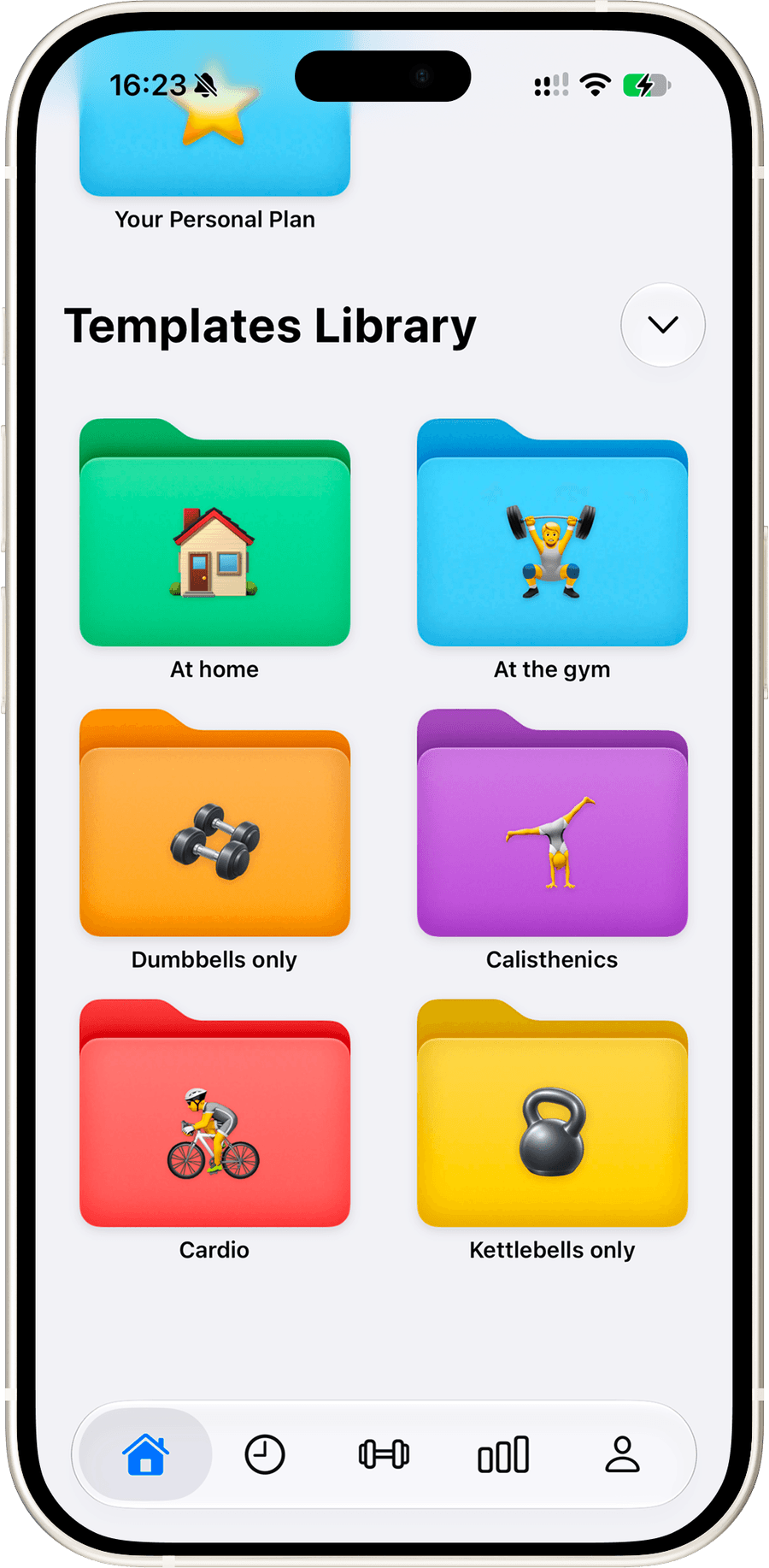
Programs and templates
Hevy offers 26 ready programs and a generated plan with Hevy Trainer. Pawer has a templates library sorted by where you train, and folders for your own.
Pawer
Who should pick which
You use Android
Hevy
Pawer is iPhone only. Hevy runs on Android and Wear OS.
You log from your wrist
Hevy
Hevy has Apple Watch and Wear OS apps. Pawer has neither.
Friends keep you consistent
Hevy
Hevy's feed, streaks and leaderboards are its core. Pawer has no social layer.
You train with a coach
Hevy
Hevy Coach lets a trainer assign programs straight into your app.
Your gym has no signal
Pawer
Every screen and every exercise video in Pawer works in airplane mode.
You want no account
Pawer
Pawer never asks you to sign up, and your log never leaves your phone.
You are learning the lifts
Pawer
Each of the 412 exercises has a real video with the working muscles highlighted.
You want to pay once
Pawer
Pawer's lifetime unlock is $69.99, against $74.99 for Hevy's.
Switching from Hevy to Pawer
You do not have to start over. Pawer reads Hevy's export file directly, so your history comes with you.
- 1In Hevy, open your Profile, tap the settings gear, then Export & Import Data.
- 2Tap Export Workouts and save the CSV file to Files.
- 3In Pawer, go to Settings and tap Import Data.
- 4Pick the Hevy file. Your workouts, exercises, sets, reps and weights show up in History, and your PRs are worked out from them.
Keep Hevy installed until you have checked the import. Your Hevy account stays as it was, so nothing is lost if you want to go back.
If your old log is in notes, a spreadsheet or a PDF instead, the free Workout Log Converter turns it into a file Pawer can import. Open the Workout Log Converter
Frequently asked questions
Is Pawer cheaper than Hevy?
It depends on the plan. Both cost $2.99 a month. Hevy's yearly plan is cheaper at $23.99 against Pawer's $29.99. Pawer's lifetime unlock is cheaper at $69.99 against Hevy's $74.99. Both apps let you log unlimited workouts for free.
Can I move my Hevy history to Pawer?
Yes. Export your workouts as a CSV from Hevy under Profile, Settings, Export & Import Data, then in Pawer go to Settings and tap Import Data and choose the file.
Is Pawer on Android?
No. Pawer is an iPhone app. If you need Android, Wear OS or a web app, Hevy is the better choice.
Does Pawer have an Apple Watch app?
Not today. Pawer is built for the iPhone, and its rest timer runs as a Live Activity on your Lock Screen and in the Dynamic Island, so you can see it without opening the app. Hevy has Apple Watch and Wear OS apps.
Do I need an account to use Pawer or Hevy?
Pawer needs no account: open it and start logging, and your data stays on your phone. Hevy needs an account, which is also what lets it sync your log between devices.
Which app is better for beginners?
Both are easy to pick up. Pawer has a demonstration video for every exercise that plays offline, which helps when you are learning form. Hevy has a slightly larger library with animations and can generate a program for you with Hevy Trainer on Pro.
What happens to my Pawer data if I lose my phone?
Pawer has no cloud copy, so your log is only as safe as your phone's own backup. Keep iCloud or computer backups turned on. Hevy stores your workouts on its servers, so they survive a lost phone.
Sources and how we compared
Hevy's prices, free tier limits and features come from Hevy's own pages and its US App Store listing, read on October 14, 2026. Pawer's come from the app itself. Wins go to the app that is meaningfully better on that row; anything close is a tie.
Social, coaching and AI
1 to Pawer, 3 to Hevy, 1 tied
Hevy is built around a feed: you follow friends, like and comment on their workouts, and copy their routines. Pawer leaves all of that out on purpose. It has no feed, no AI and no coach features, and you share a template only when you send someone the link.